在深度学习语音降噪模型的部署过程中,选择合适的推理引擎至关重要。ONNX Runtime(ORT)作为微软开源的跨平台推理引擎,在性能、兼容性和易用性方面表现出色,已成为许多生产环境的首选。本文将介绍为什么选择ORT,ORT的核心概念和使用流程,以及在使用ORT进行语音降噪推理时需要注意的关键事项,特别是针对时序模型(如GRU/LSTM)的隐状态管理。

一、为什么选择ORT?

1.1 跨平台支持

ORT提供了广泛的平台支持,包括:

  • CPU推理:支持x86、ARM等架构,可在Windows、Linux、macOS、Android、iOS等系统运行
  • GPU加速:支持CUDA(NVIDIA GPU)、DirectML(Windows)、TensorRT等
  • 专用硬件:支持CoreML(Apple Silicon)、OpenVINO(Intel)、QNN(Qualcomm)等

这种跨平台特性使得同一套代码可以在不同设备上运行,大大降低了部署成本。

1.2 性能优化

ORT在性能方面做了大量优化:

  • 图优化:自动进行算子融合、常量折叠、死代码消除等优化
  • 执行提供者(Execution Provider):针对不同硬件提供专门的优化实现
  • 动态形状支持:支持动态batch size和序列长度,适合实时推理场景

1.3 模型格式标准化

ORT基于ONNX(Open Neural Network Exchange)格式,这是业界标准的模型交换格式:

  • 框架无关:可以从PyTorch、TensorFlow、Keras等框架导出ONNX模型
  • 版本兼容:ONNX规范持续演进,ORT保持向后兼容
  • 工具生态:丰富的模型转换和优化工具

1.4 易于集成

ORT提供了多种语言绑定:

  • C++ API:适合高性能场景和嵌入式设备
  • Python API:便于快速原型开发和调试
  • C#、Java、JavaScript:支持多种应用场景

1.5 活跃的社区支持

作为微软开源项目,ORT拥有活跃的社区和持续的更新,bug修复和新功能迭代速度快。

二、ORT基本概念与推理流程

2.1 核心概念

 1
 2
 3
 4
 5
 6
 7
 8
 9
10
11
12
13
14
15
16
   ┌───────────────────────────────┐
   │ OrtEnv (运行时环境)         │
   │ └─ 管理全局资源、线程池等     │
   └──────────────┬────────────────┘
   ┌──────────────┴────────────────┐
   │ OrtSession (推理会话)        │
   │ └─ 持有已加载的 ONNX 模型      │
   └──────────────┬────────────────┘
   ┌──────────────┴────────────────────────┐
   │ OrtRun(一次推理调用)                │
   │ ├─ 输入 OrtValue (Tensor 等)           │
   │ ├─ 输出 OrtValue                      │
   │ └─ 在 Env/Session 的线程池中执行      │
   └────────────────────────────────────────┘

OrtEnv(运行时环境)

OrtEnv是ORT的全局运行时环境,负责管理线程池、日志等全局资源。通常一个进程只需要创建一个OrtEnv实例:

 1
 2
 3
 4
 5
 6
 7
 8
 9
10
#include <onnxruntime_c_api.h>

// 创建运行时环境
OrtEnv* env = NULL;
OrtStatus* status = OrtCreateEnv(ORT_LOGGING_LEVEL_WARNING, "ORT", &env);
if (status != NULL) {
    // 错误处理
    const char* msg = OrtGetErrorMessage(status);
    OrtReleaseStatus(status);
}

OrtSession(推理会话)

OrtSession负责加载ONNX模型并执行推理。创建会话需要先创建会话选项:

 1
 2
 3
 4
 5
 6
 7
 8
 9
10
11
12
13
14
15
16
17
18
19
20
#include <onnxruntime_c_api.h>

// 1. 创建会话选项
OrtSessionOptions* session_options = NULL;
OrtCreateSessionOptions(&session_options);

// 2. 创建推理会话
OrtSession* session = NULL;
const char* model_path = "denoise_model.onnx";
status = OrtCreateSession(env, model_path, session_options, &session);
if (status != NULL) {
    // 错误处理
    const char* msg = OrtGetErrorMessage(status);
    OrtReleaseStatus(status);
}

// 3. 释放资源(使用完毕后)
OrtReleaseSessionOptions(session_options);
OrtReleaseSession(session);
OrtReleaseEnv(env);

Execution Provider (EP)

执行提供者决定了模型在哪个硬件上运行。在C API中,通过OrtSessionOptionsAppendExecutionProvider添加EP:

 1
 2
 3
 4
 5
 6
 7
 8
 9
10
11
12
13
14
15
// CPU执行(默认,无需显式添加)
// 直接创建会话即可使用CPU

// CUDA执行(需要NVIDIA GPU)
OrtSessionOptionsAppendExecutionProvider_CUDA(session_options, 0);

// TensorRT执行(需要NVIDIA GPU和TensorRT)
OrtTensorRTProviderOptions trt_options = {0};
OrtSessionOptionsAppendExecutionProvider_TensorRT(session_options, &trt_options);

// CoreML执行(macOS/iOS)
OrtSessionOptionsAppendExecutionProvider_CoreML(session_options, 0);

// 创建会话(会按顺序尝试EP,失败则回退到下一个)
OrtCreateSession(env, model_path, session_options, &session);

Input/Output

模型的输入输出通过OrtValue传递,需要手动创建和管理:

 1
 2
 3
 4
 5
 6
 7
 8
 9
10
11
12
13
14
15
16
17
18
19
20
21
22
23
24
25
26
27
28
29
30
31
32
33
34
35
36
37
38
39
40
41
42
43
// 1. 获取输入输出信息
size_t num_input_nodes;
OrtStatus* status = OrtSessionGetInputCount(session, &num_input_nodes);

const char* input_name;
OrtTypeInfo* input_type_info;
OrtSessionGetInputName(session, 0, allocator, &input_name);
OrtSessionGetInputTypeInfo(session, 0, &input_type_info);

// 2. 准备输入数据
float input_data[] = { /* audio_features数据 */ };
int64_t input_shape[] = {1, 480};  // batch_size, feature_dim
size_t input_tensor_size = 480;

OrtValue* input_tensor = NULL;
OrtMemoryInfo* memory_info;
OrtCreateCpuMemoryInfo(OrtArenaAllocator, OrtMemTypeDefault, &memory_info);
OrtCreateTensorWithDataAsOrtValue(
    memory_info,
    input_data, input_tensor_size * sizeof(float),
    input_shape, 2,
    ONNX_TENSOR_ELEMENT_DATA_TYPE_FLOAT,
    &input_tensor
);

// 3. 执行推理
const char* input_names[] = {input_name};
const char* output_names[] = {"output"};  // 根据模型实际输出名称
OrtValue* output_tensor = NULL;

status = OrtRun(session, NULL,
    input_names, &input_tensor, 1,
    output_names, 1, &output_tensor);

// 4. 获取输出数据
float* output_data;
OrtGetTensorMutableData(output_tensor, (void**)&output_data);
// 使用output_data...

// 5. 释放资源
OrtReleaseValue(output_tensor);
OrtReleaseValue(input_tensor);
OrtReleaseMemoryInfo(memory_info);

2.2 性能优化选项

ORT提供了多种性能优化选项,在C API中通过OrtSessionOptions进行配置:

 1
 2
 3
 4
 5
 6
 7
 8
 9
10
11
12
13
14
15
16
17
18
19
20
21
22
23
24
25
26
27
OrtSessionOptions* session_options = NULL;
OrtCreateSessionOptions(&session_options);

// 图优化级别
// ORT_DISABLE_ALL, ORT_ENABLE_BASIC, ORT_ENABLE_EXTENDED, ORT_ENABLE_ALL
OrtSetSessionGraphOptimizationLevel(session_options, ORT_ENABLE_ALL);

// 线程数设置
OrtSetIntraOpNumThreads(session_options, 4);  // 算子内部并行线程数
OrtSetInterOpNumThreads(session_options, 2); // 算子间并行线程数

// 内存模式
OrtEnableMemPattern(session_options);  // 启用内存模式优化
OrtEnableCpuMemArena(session_options); // 启用CPU内存池

// 执行模式
OrtSetSessionExecutionMode(session_options, ORT_SEQUENTIAL);  // 顺序执行
// OrtSetSessionExecutionMode(session_options, ORT_PARALLEL);  // 并行执行

// 优化配置文件(可选,用于更精细的控制)
// OrtSetOptimizedModelFilePath(session_options, "optimized_model.onnx");

// 创建会话时应用这些选项
OrtCreateSession(env, model_path, session_options, &session);

// 使用完毕后释放
OrtReleaseSessionOptions(session_options);

三、语音降噪推理的特殊注意事项

语音降噪模型通常使用时序建模网络(如GRU、LSTM),这些网络具有隐状态(hidden state),在实时推理时需要特别注意状态管理。

3.1 为什么ORT不保存隐状态?

ORT(ONNX Runtime)采用**无状态(stateless)**的设计理念,即每次推理调用都是独立的,ORT不会在内部保存任何状态信息。这种设计有以下几个重要原因:

3.1.1 设计理念:无状态推理

ORT的核心设计原则是每次OrtRun调用都是完全独立的,不依赖之前的调用结果。这种设计带来以下优势:

  1. 线程安全:多个线程可以同时使用同一个OrtSession进行推理,而不会因为共享状态导致竞争条件
  2. 可重现性:相同的输入总是产生相同的输出,不受历史状态影响
  3. 灵活性:可以灵活控制何时重置状态、何时复用状态,适应不同的应用场景

3.1.2 状态管理的责任归属

在ORT的设计中,状态管理是应用层的责任,而不是推理引擎的责任。这样做的好处是:

  • 应用层控制:应用可以根据业务需求决定何时重置状态、如何管理多个流的状态
  • 内存管理:应用可以精确控制状态的内存分配和释放时机
  • 多实例支持:同一个模型可以同时处理多个独立的音频流,每个流维护自己的状态

3.1.3 与训练框架的差异

在训练框架(如PyTorch、TensorFlow)中,RNN/LSTM层通常会维护隐状态:

1
2
3
# PyTorch训练时的行为
lstm = nn.LSTM(input_size, hidden_size)
output, (hidden, cell) = lstm(input, (hidden, cell))  # 状态在层内部管理

但在ONNX导出和ORT推理时,隐状态被显式化为模型的输入和输出:

1
2
3
// ONNX模型结构
// 输入: [audio_features, hidden_state, cell_state]  // 显式输入
// 输出: [denoised_features, new_hidden_state, new_cell_state]  // 显式输出

这种显式化的设计使得:

  • 状态在模型外部可见和可控
  • 可以跨框架、跨平台保持一致的行为
  • 便于调试和优化

3.1.4 实际影响

对于语音降噪等时序应用,ORT不保存隐状态意味着:

  1. 必须手动传递状态:每次推理时,需要将上一次的输出状态作为下一次的输入
  2. 状态持久化由应用负责:如果需要保存状态(如断点续传),需要应用层实现
  3. 多流处理需要独立状态:处理多个音频流时,需要为每个流维护独立的状态变量

这种设计虽然增加了应用层的复杂度,但提供了更大的灵活性和控制力,特别适合生产环境中的复杂场景。

3.2 实战使用ORT进行Rnnoise降噪推理

RNNoise是一个基于深度学习的实时语音降噪模型,使用了三个GRU层(VAD GRU、Noise GRU、Denoise GRU)进行时序建模。在使用ORT进行推理时,需要特别注意这三个GRU层的隐状态管理。

3.2.1 转换成ONNX模型时导出GRU隐状态输入输出端口

RNNoise的Keras训练模型通常只接受特征输入,GRU的隐状态在内部管理。但在导出ONNX模型用于ORT推理时,需要将隐状态显式化为模型的输入和输出端口,这样才能在应用层控制状态传递。

关键步骤:

  1. 重建模型结构:创建一个新的推理模型,为每个GRU层添加initial_state输入和return_state=True输出
  2. 复制权重:从训练模型复制所有层的权重到新模型
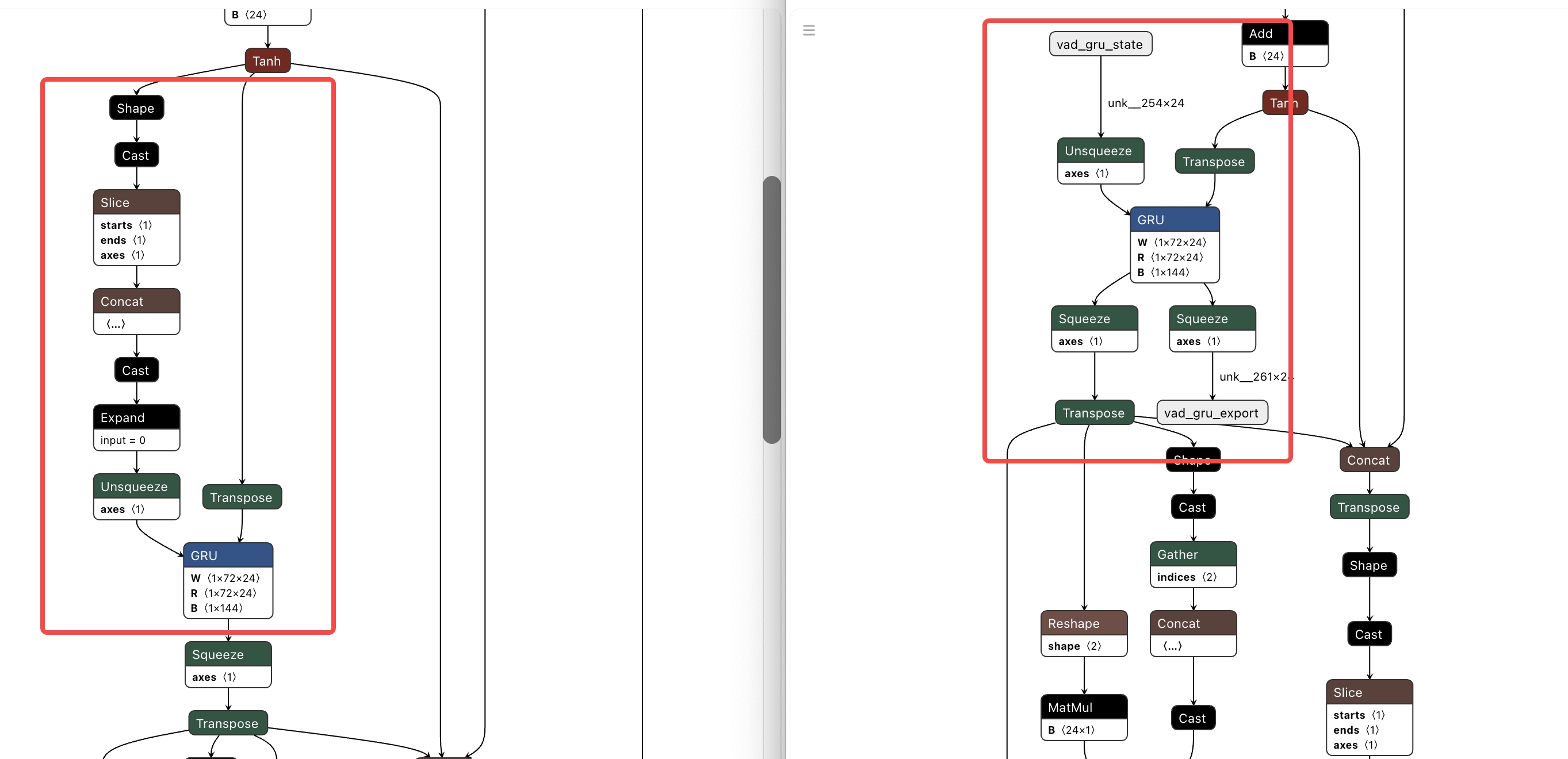
  3. 定义输入输出:新模型有4个输入(features + 3个GRU状态)和5个输出(denoise_output + vad_output + 3个GRU状态)

下图中,左侧为没有导出隐状态的onnx模型可视化图,可以看到gru的隐状态每次都是被重置的;右侧为导出了隐状态的onnx模型可视化图,可以看到gru节点对应了一个gru state输入端口和一个gru state的输出端口。

rnnoise-onnx-导出隐状态

以下是完整的转换代码:

  1
  2
  3
  4
  5
  6
  7
  8
  9
 10
 11
 12
 13
 14
 15
 16
 17
 18
 19
 20
 21
 22
 23
 24
 25
 26
 27
 28
 29
 30
 31
 32
 33
 34
 35
 36
 37
 38
 39
 40
 41
 42
 43
 44
 45
 46
 47
 48
 49
 50
 51
 52
 53
 54
 55
 56
 57
 58
 59
 60
 61
 62
 63
 64
 65
 66
 67
 68
 69
 70
 71
 72
 73
 74
 75
 76
 77
 78
 79
 80
 81
 82
 83
 84
 85
 86
 87
 88
 89
 90
 91
 92
 93
 94
 95
 96
 97
 98
 99
100
101
102
103
104
105
106
107
108
109
110
111
112
113
114
115
116
117
118
119
120
121
122
123
124
125
126
127
128
129
130
131
132
133
134
135
136
137
138
139
140
141
142
143
144
145
146
147
148
149
150
151
152
153
154
155
156
157
158
159
160
161
162
163
164
165
166
167
168
169
170
171
172
173
174
175
176
177
178
179
180
181
182
183
184
185
186
187
188
189
190
191
192
193
194
195
196
197
198
199
200
201
202
203
204
205
206
207
208
209
210
211
212
213
214
215
216
217
218
219
220
221
222
223
224
225
226
227
228
229
230
231
232
233
234
235
236
237
238
239
240
241
242
243
244
245
246
247
import keras.backend as K
from keras.constraints import Constraint
from keras.layers import Input, Dense, GRU, concatenate
from keras.models import Model


def my_crossentropy(y_true, y_pred):
    return K.mean(2 * K.abs(y_true - 0.5) * K.binary_crossentropy(y_pred, y_true), axis=-1)


def mymask(y_true):
    return K.minimum(y_true + 1.0, 1.0)


def msse(y_true, y_pred):
    return K.mean(mymask(y_true) * K.square(K.sqrt(y_pred) - K.sqrt(y_true)), axis=-1)


def mycost(y_true, y_pred):
    return K.mean(
        mymask(y_true)
        * (
            10 * K.square(K.square(K.sqrt(y_pred) - K.sqrt(y_true)))
            + K.square(K.sqrt(y_pred) - K.sqrt(y_true))
            + 0.01 * K.binary_crossentropy(y_pred, y_true)
        ),
        axis=-1,
    )


def my_accuracy(y_true, y_pred):
    return K.mean(2 * K.abs(y_true - 0.5) * K.equal(y_true, K.round(y_pred)), axis=-1)


class WeightClip(Constraint):
    # Accept **kwargs to be compatible with Keras deserialization that may pass 'name' etc.
    def __init__(self, c=2, **kwargs):  # kwargs may include 'name'
        super().__init__()
        self.c = c

    def __call__(self, p):
        return K.clip(p, -self.c, self.c)

    def get_config(self):
        return {'name': self.__class__.__name__, 'c': self.c}


CUSTOM_OBJECTS = {
    'my_crossentropy': my_crossentropy,
    'mymask': mymask,
    'msse': msse,
    'mycost': mycost,
    'my_accuracy': my_accuracy,
    'WeightClip': WeightClip,
}


def rebuild_model_with_states(training_model: Model) -> Model:
    """
    自动重建模型,添加GRU隐状态输入/输出端口。
    如果模型已经有GRU状态端口,直接返回原模型。
    """
    # 检查是否已有GRU状态端口
    if len(training_model.inputs) == 4 and len(training_model.outputs) == 5:
        print("  Model already has GRU state ports, skipping rebuild")
        return training_model
    
    print("  Rebuilding model with GRU state inputs/outputs...")
    
    # 新的推理输入(带状态)
    features_in = Input(shape=(None, 42), name='features')
    vad_state_in = Input(shape=(24,), name='vad_gru_state')
    noise_state_in = Input(shape=(48,), name='noise_gru_state')
    denoise_state_in = Input(shape=(96,), name='denoise_gru_state')

    # 复制训练模型的层配置并加载权重
    # 1) input_dense
    input_dense_src = training_model.get_layer('input_dense')
    input_dense = Dense(24, activation='tanh', name='input_dense_export',
                        kernel_constraint=input_dense_src.kernel_constraint,
                        bias_constraint=input_dense_src.bias_constraint)
    tmp_export = input_dense(features_in)
    input_dense.set_weights(input_dense_src.get_weights())

    # 2) vad_gru (return_sequences+return_state)
    vad_gru_src = training_model.get_layer('vad_gru')
    vad_gru_exp = GRU(24, activation='tanh', recurrent_activation='sigmoid',
                      return_sequences=True, return_state=True, name='vad_gru_export',
                      kernel_regularizer=vad_gru_src.kernel_regularizer,
                      recurrent_regularizer=vad_gru_src.recurrent_regularizer,
                      kernel_constraint=vad_gru_src.kernel_constraint,
                      recurrent_constraint=vad_gru_src.recurrent_constraint,
                      bias_constraint=vad_gru_src.bias_constraint)
    vad_seq, vad_state_out = vad_gru_exp(tmp_export, initial_state=vad_state_in)
    vad_gru_exp.set_weights(vad_gru_src.get_weights())

    # 3) vad_output
    vad_output_src = training_model.get_layer('vad_output')
    vad_output_exp_layer = Dense(1, activation='sigmoid', name='vad_output_export',
                                 kernel_constraint=vad_output_src.kernel_constraint,
                                 bias_constraint=vad_output_src.bias_constraint)
    vad_output_exp = vad_output_exp_layer(vad_seq)
    vad_output_exp_layer.set_weights(vad_output_src.get_weights())

    # 4) noise_gru 输入:concat([tmp_export, vad_seq, features_in])
    noise_in = concatenate([tmp_export, vad_seq, features_in], name='noise_concat_export')
    noise_gru_src = training_model.get_layer('noise_gru')
    noise_gru_exp = GRU(48, activation='relu', recurrent_activation='sigmoid',
                        return_sequences=True, return_state=True, name='noise_gru_export',
                        kernel_regularizer=noise_gru_src.kernel_regularizer,
                        recurrent_regularizer=noise_gru_src.recurrent_regularizer,
                        kernel_constraint=noise_gru_src.kernel_constraint,
                        recurrent_constraint=noise_gru_src.recurrent_constraint,
                        bias_constraint=noise_gru_src.bias_constraint)
    noise_seq, noise_state_out = noise_gru_exp(noise_in, initial_state=noise_state_in)
    noise_gru_exp.set_weights(noise_gru_src.get_weights())

    # 5) denoise_gru 输入:concat([vad_seq, noise_seq, features_in])
    denoise_in = concatenate([vad_seq, noise_seq, features_in], name='denoise_concat_export')
    denoise_gru_src = training_model.get_layer('denoise_gru')
    denoise_gru_exp = GRU(96, activation='tanh', recurrent_activation='sigmoid',
                          return_sequences=True, return_state=True, name='denoise_gru_export',
                          kernel_regularizer=denoise_gru_src.kernel_regularizer,
                          recurrent_regularizer=denoise_gru_src.recurrent_regularizer,
                          kernel_constraint=denoise_gru_src.kernel_constraint,
                          recurrent_constraint=denoise_gru_src.recurrent_constraint,
                          bias_constraint=denoise_gru_src.bias_constraint)
    denoise_seq, denoise_state_out = denoise_gru_exp(denoise_in, initial_state=denoise_state_in)
    denoise_gru_exp.set_weights(denoise_gru_src.get_weights())

    # 6) denoise_output
    denoise_output_src = training_model.get_layer('denoise_output')
    denoise_output_exp_layer = Dense(22, activation='sigmoid', name='denoise_output_export',
                                     kernel_constraint=denoise_output_src.kernel_constraint,
                                     bias_constraint=denoise_output_src.bias_constraint)
    denoise_output_exp = denoise_output_exp_layer(denoise_seq)
    denoise_output_exp_layer.set_weights(denoise_output_src.get_weights())

    export_model = Model(
        inputs=[features_in, vad_state_in, noise_state_in, denoise_state_in],
        outputs=[denoise_output_exp, vad_output_exp, vad_state_out, noise_state_out, denoise_state_out],
        name='rnnoise_export_with_states'
    )
    
    print("  ✓ Model rebuilt successfully with GRU state ports")
    return export_model


def convert(hdf5_path: str, onnx_path: str, opset: int = 13, auto_rebuild: bool = False) -> None:
    if not os.path.isfile(hdf5_path):
        raise FileNotFoundError(f"HDF5 model not found: {hdf5_path}")

    print(f"Loading Keras model from: {hdf5_path}")
    # Load with custom objects registered for deserialization
    model = keras.models.load_model(hdf5_path, custom_objects=CUSTOM_OBJECTS)
    
    # Auto-rebuild model with GRU states if needed
    if auto_rebuild:
        print("\n=== Auto-Rebuild Mode ===")
        print("  Checking if model needs GRU state ports...")
        model = rebuild_model_with_states(model)
        print("  Model ready for conversion with GRU state ports\n")

    # Check if the model has GRU state inputs/outputs
    num_inputs = len(model.inputs)
    num_outputs = len(model.outputs)
    
    print(f"Model has {num_inputs} input(s) and {num_outputs} output(s)")
    
    # Print input information
    for i, inp in enumerate(model.inputs):
        print(f"  Input {i}: {inp.name}, shape: {inp.shape}")
    
    # Print output information
    for i, out in enumerate(model.outputs):
        print(f"  Output {i}: {out.name}, shape: {out.shape}")
    
    # Check if this is a model with GRU states (4 inputs and 5 outputs)
    if num_inputs == 4 and num_outputs == 5:
        print("Detected model with GRU state inputs/outputs")
        # Build input signature for model with efficient state management
        input_specs = []
        for inp in model.inputs:
            inp_name = inp.name.split(':')[0]
            inp_shape = inp.shape.as_list()
            
            # Handle different input shapes
            if len(inp_shape) == 3:  # features: (None, None, 42)
                spec = tf.TensorSpec([None, None, inp_shape[2]], tf.float32, name=inp_name)
            elif len(inp_shape) == 2:  # GRU states: (None, hidden_size)
                spec = tf.TensorSpec([None, inp_shape[1]], tf.float32, name=inp_name)
            else:
                # Fallback: use dynamic shape
                spec = tf.TensorSpec([None] * len(inp_shape), tf.float32, name=inp_name)
            
            input_specs.append(spec)
        
        print(f"Converting to ONNX (opset {opset}) with GRU state inputs/outputs...")
        # Convert with all input signatures
        tf2onnx.convert.from_keras(model, input_signature=input_specs, output_path=onnx_path, opset=opset)
        
    elif num_inputs == 1:
        print("Detected standard model without GRU state ports")
        # Use a dynamic input signature (None, None, 42) to preserve time dimension flexibility
        input_name = model.inputs[0].name.split(':')[0]
        spec = (tf.TensorSpec([None, None, 42], tf.float32, name=input_name),)
        
        print(f"Converting to ONNX (opset {opset})...")
        # Convert directly from the Keras model
        tf2onnx.convert.from_keras(model, input_signature=spec, output_path=onnx_path, opset=opset)
    else:
        # Generic conversion for models with multiple inputs but unknown structure
        print(f"Converting to ONNX (opset {opset}) with {num_inputs} inputs...")
        input_specs = []
        for inp in model.inputs:
            inp_name = inp.name.split(':')[0]
            inp_shape = inp.shape.as_list()
            # Use dynamic shapes for flexibility
            spec = tf.TensorSpec([None] * len(inp_shape), tf.float32, name=inp_name)
            input_specs.append(spec)
        tf2onnx.convert.from_keras(model, input_signature=input_specs, output_path=onnx_path, opset=opset)

    print(f"Saved ONNX model to: {onnx_path}")
    

def main():
    parser = argparse.ArgumentParser(description='Convert Keras HDF5 model to ONNX for RNNoise.')
    parser.add_argument('--input', '-i', required=True, help='Path to Keras HDF5 model file')
    parser.add_argument('--output', '-o', required=False, help='Path to output ONNX file')
    parser.add_argument('--opset', type=int, default=13, help='ONNX opset version (default: 13)')
    parser.add_argument('--auto-rebuild', action='store_true', 
                        help='Automatically rebuild model with GRU state ports if missing')
    args = parser.parse_args()

    input_path = os.path.abspath(args.input)
    output_path = args.output
    if not output_path:
        base, _ = os.path.splitext(input_path)
        output_path = base + '.onnx'
    output_path = os.path.abspath(output_path)

    os.makedirs(os.path.dirname(output_path), exist_ok=True)

    convert(input_path, output_path, opset=args.opset, auto_rebuild=args.auto_rebuild)

if __name__ == '__main__':
    main()

3.2.2 推理时对隐状态进行管理

前面导出onnx模型时,已经为每个GRU节点导出了隐状态的输入和输出端口,因此在每一次帧的时候,只需要将上一次推理保存的隐状态信息输入到对应的隐状态输入端口,同时在推理后对GRU节点的隐状态输出端口进行保存,就可以实现流式推理GRU保留历史信息了。

以下是部分核心函数实现,只需要将其嵌入到原rnnoise降噪代码中就可以实现ort推理了。

  1
  2
  3
  4
  5
  6
  7
  8
  9
 10
 11
 12
 13
 14
 15
 16
 17
 18
 19
 20
 21
 22
 23
 24
 25
 26
 27
 28
 29
 30
 31
 32
 33
 34
 35
 36
 37
 38
 39
 40
 41
 42
 43
 44
 45
 46
 47
 48
 49
 50
 51
 52
 53
 54
 55
 56
 57
 58
 59
 60
 61
 62
 63
 64
 65
 66
 67
 68
 69
 70
 71
 72
 73
 74
 75
 76
 77
 78
 79
 80
 81
 82
 83
 84
 85
 86
 87
 88
 89
 90
 91
 92
 93
 94
 95
 96
 97
 98
 99
100
101
102
103
104
105
106
107
108
109
110
111
112
113
114
115
116
117
118
119
120
121
122
123
124
125
126
127
128
129
130
131
132
133
134
135
136
137
138
139
140
141
142
143
144
145
146
147
148
149
150
151
152
153
154
155
156
157
158
159
160
161
162
163
164
165
166
167
168
169
170
171
172
173
174
175
176
177
178
179
180
181
182
183
184
185
186
187
188
189
190
191
192
193
194
195
196
197
198
199
200
201
202
203
204
205
206
207
208
209
210
211
212
213
214
215
216
217
218
219
220
221
222
223
224
225
226
227
228
229
230
231
232
233
234
235
236
237
238
239
240
241
242
243
244
245
246
247
248
249
250
251
252
253
254
255
256
257
258
259
260
261
262
263
264
265
266
267
268
269
270
271
272
273
274
275
276
277
278
279
280
281
282
283
284
285
286
287
288
289
290
291
292
293
294
295
296
297
298
299
300
301
302
303
304
305
306
307
308
309
310
311
312
313
314
315
316
317
318
319
320
321
322
323
324
325
326
327
328
329
330
331
332
333
334
335
336
337
338
339
340
341
342
343
344
345
346
347
348
349
350
351
352
353
354
355
356
357
358
359
360
361
362
363
364
365
366
367
368
369
370
371
372
373
374
375
376
377
378
379
// Initialize ONNX model
int initialize_onnx_model(RNNoiseContext* ctx, const char* model_path) {
    // Get ONNX Runtime API
    const OrtApiBase* api_base = OrtGetApiBase();
    if (!api_base) {
        fprintf(stderr, "Error getting ONNX Runtime API base\n");
        return -1;
    }
    
    ctx->api = api_base->GetApi(ORT_API_VERSION);
    if (!ctx->api) {
        fprintf(stderr, "Error getting ONNX Runtime API\n");
        return -1;
    }
    
    // Initialize ONNX Runtime environment
    OrtStatus* status = ctx->api->CreateEnv(ORT_LOGGING_LEVEL_WARNING, "RNNoiseONNX", &ctx->env);
    if (status != NULL) {
        fprintf(stderr, "Error creating ONNX Runtime environment\n");
        return -1;
    }
    
    // Create session options
    status = ctx->api->CreateSessionOptions(&ctx->session_options);
    if (status != NULL) {
        fprintf(stderr, "Error creating session options\n");
        return -1;
    }
    
    // Set session options
    status = ctx->api->SetIntraOpNumThreads(ctx->session_options, 1);
    if (status != NULL) {
        fprintf(stderr, "Error setting intra-op threads\n");
        return -1;
    }
    
    status = ctx->api->SetSessionGraphOptimizationLevel(ctx->session_options, ORT_ENABLE_EXTENDED);
    if (status != NULL) {
        fprintf(stderr, "Error setting optimization level\n");
        return -1;
    }
    
    // Create session
    status = ctx->api->CreateSession(ctx->env, model_path, ctx->session_options, &ctx->session);
    if (status != NULL) {
        fprintf(stderr, "Error creating ONNX session\n");
        return -1;
    }
    
    // Get allocator
    status = ctx->api->GetAllocatorWithDefaultOptions(&ctx->allocator);
    if (status != NULL) {
        fprintf(stderr, "Error getting allocator\n");
        return -1;
    }
    
    // Get input/output names
    size_t num_input_nodes, num_output_nodes;
    status = ctx->api->SessionGetInputCount(ctx->session, &num_input_nodes);
    if (status != NULL) {
        fprintf(stderr, "Error getting input count\n");
        return -1;
    }
    
    status = ctx->api->SessionGetOutputCount(ctx->session, &num_output_nodes);
    if (status != NULL) {
        fprintf(stderr, "Error getting output count\n");
        return -1;
    }
    
    printf("ONNX Model Info:\n");
    printf("  Input nodes: %zu\n", num_input_nodes);
    printf("  Output nodes: %zu\n", num_output_nodes);
    
    // Detect model type: 4 inputs + 5 outputs = model with GRU states
    ctx->has_gru_states = (num_input_nodes == 4 && num_output_nodes == 5);
    
    if (ctx->has_gru_states) {
        printf("  Model type: WITH GRU state inputs/outputs\n");
        
        // Get all input names
        status = ctx->api->SessionGetInputName(ctx->session, 0, ctx->allocator, &ctx->input_name);
        if (status != NULL) {
            fprintf(stderr, "Error getting features input name\n");
            return -1;
        }
        status = ctx->api->SessionGetInputName(ctx->session, 1, ctx->allocator, &ctx->input_name_vad_state);
        if (status != NULL) {
            fprintf(stderr, "Error getting VAD state input name\n");
            return -1;
        }
        status = ctx->api->SessionGetInputName(ctx->session, 2, ctx->allocator, &ctx->input_name_noise_state);
        if (status != NULL) {
            fprintf(stderr, "Error getting noise state input name\n");
            return -1;
        }
        status = ctx->api->SessionGetInputName(ctx->session, 3, ctx->allocator, &ctx->input_name_denoise_state);
        if (status != NULL) {
            fprintf(stderr, "Error getting denoise state input name\n");
            return -1;
        }
        
        // Get all output names
        status = ctx->api->SessionGetOutputName(ctx->session, 0, ctx->allocator, &ctx->output_name_denoise);
        if (status != NULL) {
            fprintf(stderr, "Error getting denoise output name\n");
            return -1;
        }
        status = ctx->api->SessionGetOutputName(ctx->session, 1, ctx->allocator, &ctx->output_name_vad);
        if (status != NULL) {
            fprintf(stderr, "Error getting VAD output name\n");
            return -1;
        }
        status = ctx->api->SessionGetOutputName(ctx->session, 2, ctx->allocator, &ctx->output_name_vad_state);
        if (status != NULL) {
            fprintf(stderr, "Error getting VAD state output name\n");
            return -1;
        }
        status = ctx->api->SessionGetOutputName(ctx->session, 3, ctx->allocator, &ctx->output_name_noise_state);
        if (status != NULL) {
            fprintf(stderr, "Error getting noise state output name\n");
            return -1;
        }
        status = ctx->api->SessionGetOutputName(ctx->session, 4, ctx->allocator, &ctx->output_name_denoise_state);
        if (status != NULL) {
            fprintf(stderr, "Error getting denoise state output name\n");
            return -1;
        }
        
        printf("  Inputs:\n");
        printf("    [0] %s (features)\n", ctx->input_name);
        printf("    [1] %s (VAD GRU state)\n", ctx->input_name_vad_state);
        printf("    [2] %s (noise GRU state)\n", ctx->input_name_noise_state);
        printf("    [3] %s (denoise GRU state)\n", ctx->input_name_denoise_state);
        printf("  Outputs:\n");
        printf("    [0] %s (denoise)\n", ctx->output_name_denoise);
        printf("    [1] %s (VAD)\n", ctx->output_name_vad);
        printf("    [2] %s (VAD GRU state)\n", ctx->output_name_vad_state);
        printf("    [3] %s (noise GRU state)\n", ctx->output_name_noise_state);
        printf("    [4] %s (denoise GRU state)\n", ctx->output_name_denoise_state);
    } else {
        printf("  Model type: Standard (without GRU state ports)\n");
        
        // Get input name (standard model)
        status = ctx->api->SessionGetInputName(ctx->session, 0, ctx->allocator, &ctx->input_name);
        if (status != NULL) {
            fprintf(stderr, "Error getting input name\n");
            return -1;
        }
        
        // Get output names (standard model)
        status = ctx->api->SessionGetOutputName(ctx->session, 0, ctx->allocator, &ctx->output_name_denoise);
        if (status != NULL) {
            fprintf(stderr, "Error getting denoise output name\n");
            return -1;
        }
        
        status = ctx->api->SessionGetOutputName(ctx->session, 1, ctx->allocator, &ctx->output_name_vad);
        if (status != NULL) {
            fprintf(stderr, "Error getting VAD output name\n");
            return -1;
        }
        
        printf("  Input: %s\n", ctx->input_name);
        printf("  Output denoise: %s\n", ctx->output_name_denoise);
        printf("  Output VAD: %s\n", ctx->output_name_vad);
    }
    
    // Allocate buffers
    ctx->input_buffer = (float*)malloc(FRAME_SIZE * sizeof(float));
    ctx->output_buffer = (float*)malloc(FRAME_SIZE * sizeof(float));
    
    if (!ctx->input_buffer || !ctx->output_buffer) {
        fprintf(stderr, "Error: Memory allocation failed\n");
        return -1;
    }
    
    // Initialize RNNoise state for feature extraction
    ctx->denoise_state = rnnoise_create(NULL);
    if (!ctx->denoise_state) {
        fprintf(stderr, "Error: Failed to create RNNoise state\n");
        return -1;
    }
    rnnoise_init(ctx->denoise_state, NULL);
    
    // Initialize biquad filter memory
    ctx->mem_hp_x[0] = 0.0f;
    ctx->mem_hp_x[1] = 0.0f;
    
    // Initialize processing buffers
    memset(ctx->X, 0, sizeof(ctx->X));
    memset(ctx->P, 0, sizeof(ctx->P));
    memset(ctx->Ex, 0, sizeof(ctx->Ex));
    memset(ctx->Ep, 0, sizeof(ctx->Ep));
    memset(ctx->Exp, 0, sizeof(ctx->Exp));
    memset(ctx->lastg, 0, sizeof(ctx->lastg));
    memset(ctx->synthesis_mem, 0, sizeof(ctx->synthesis_mem));
    
    // Initialize frame count
    ctx->frame_count = 0;
    
    // Initialize GRU states if model supports it
    initialize_gru_states(ctx);
    
    printf("ONNX model loaded successfully: %s\n", model_path);
    return 0;
}

// Initialize GRU states
void initialize_gru_states(RNNoiseContext* ctx) {
    memset(ctx->vad_gru_state, 0, sizeof(ctx->vad_gru_state));
    memset(ctx->noise_gru_state, 0, sizeof(ctx->noise_gru_state));
    memset(ctx->denoise_gru_state, 0, sizeof(ctx->denoise_gru_state));
    ctx->gru_states_initialized = 0;
}

// ONNX inference with external state management
int onnx_inference_with_states(RNNoiseContext* ctx, const float* features, float* gains, float* vad) {
    // Prepare separate input tensors for features and GRU states
    float features_data[42];
    float vad_state_data[24];
    float noise_state_data[48];
    float denoise_state_data[96];
    
    // Copy features
    memcpy(features_data, features, 42 * sizeof(float));
    
    // Copy GRU states (use saved states for next frame)
    memcpy(vad_state_data, ctx->vad_gru_state, 24 * sizeof(float));
    memcpy(noise_state_data, ctx->noise_gru_state, 48 * sizeof(float));
    memcpy(denoise_state_data, ctx->denoise_gru_state, 96 * sizeof(float));
    
    // Create input tensors
    const int64_t features_shape[] = {1, 1, 42};
    const int64_t vad_state_shape[] = {1, 24};
    const int64_t noise_state_shape[] = {1, 48};
    const int64_t denoise_state_shape[] = {1, 96};
    
    OrtMemoryInfo* memory_info;
    OrtStatus* status = ctx->api->CreateCpuMemoryInfo(OrtArenaAllocator, OrtMemTypeDefault, &memory_info);
    if (status != NULL) {
        fprintf(stderr, "Error creating memory info\n");
        return -1;
    }
    
    // Create input tensors
    OrtValue* features_tensor = NULL;
    OrtValue* vad_state_tensor = NULL;
    OrtValue* noise_state_tensor = NULL;
    OrtValue* denoise_state_tensor = NULL;
    
    status = ctx->api->CreateTensorWithDataAsOrtValue(
        memory_info, features_data, 42 * sizeof(float),
        features_shape, 3, ONNX_TENSOR_ELEMENT_DATA_TYPE_FLOAT, &features_tensor);
    if (status != NULL) {
        fprintf(stderr, "Error creating features tensor\n");
        ctx->api->ReleaseMemoryInfo(memory_info);
        return -1;
    }
    
    status = ctx->api->CreateTensorWithDataAsOrtValue(
        memory_info, vad_state_data, 24 * sizeof(float),
        vad_state_shape, 2, ONNX_TENSOR_ELEMENT_DATA_TYPE_FLOAT, &vad_state_tensor);
    if (status != NULL) {
        fprintf(stderr, "Error creating VAD state tensor\n");
        ctx->api->ReleaseValue(features_tensor);
        ctx->api->ReleaseMemoryInfo(memory_info);
        return -1;
    }
    
    status = ctx->api->CreateTensorWithDataAsOrtValue(
        memory_info, noise_state_data, 48 * sizeof(float),
        noise_state_shape, 2, ONNX_TENSOR_ELEMENT_DATA_TYPE_FLOAT, &noise_state_tensor);
    if (status != NULL) {
        fprintf(stderr, "Error creating noise state tensor\n");
        ctx->api->ReleaseValue(features_tensor);
        ctx->api->ReleaseValue(vad_state_tensor);
        ctx->api->ReleaseMemoryInfo(memory_info);
        return -1;
    }
    
    status = ctx->api->CreateTensorWithDataAsOrtValue(
        memory_info, denoise_state_data, 96 * sizeof(float),
        denoise_state_shape, 2, ONNX_TENSOR_ELEMENT_DATA_TYPE_FLOAT, &denoise_state_tensor);
    if (status != NULL) {
        fprintf(stderr, "Error creating denoise state tensor\n");
        ctx->api->ReleaseValue(features_tensor);
        ctx->api->ReleaseValue(vad_state_tensor);
        ctx->api->ReleaseValue(noise_state_tensor);
        ctx->api->ReleaseMemoryInfo(memory_info);
        return -1;
    }
    
    // Prepare input names and tensors
    const char* input_names[] = {ctx->input_name, ctx->input_name_vad_state, 
                                 ctx->input_name_noise_state, ctx->input_name_denoise_state};
    OrtValue* input_tensors[] = {features_tensor, vad_state_tensor, noise_state_tensor, denoise_state_tensor};
    
    // Prepare output names
    const char* output_names[] = {ctx->output_name_denoise, ctx->output_name_vad, 
                                  ctx->output_name_vad_state, ctx->output_name_noise_state, 
                                  ctx->output_name_denoise_state};
    OrtValue* output_tensors[5] = {NULL, NULL, NULL, NULL, NULL};
    
    // Run inference
    status = ctx->api->Run(ctx->session, NULL, input_names, (const OrtValue* const*)input_tensors, 4,
                   output_names, 5, output_tensors);
    if (status != NULL) {
        fprintf(stderr, "Error running inference\n");
        ctx->api->ReleaseValue(features_tensor);
        ctx->api->ReleaseValue(vad_state_tensor);
        ctx->api->ReleaseValue(noise_state_tensor);
        ctx->api->ReleaseValue(denoise_state_tensor);
        ctx->api->ReleaseMemoryInfo(memory_info);
        return -1;
    }
    
    // Get output data
    float* denoise_output = NULL;
    float* vad_output = NULL;
    float* updated_vad_state = NULL;
    float* updated_noise_state = NULL;
    float* updated_denoise_state = NULL;
    
    status = ctx->api->GetTensorMutableData(output_tensors[0], (void**)&denoise_output);
    if (status != NULL) {
        fprintf(stderr, "Error getting denoise output data\n");
        goto cleanup;
    }
    
    status = ctx->api->GetTensorMutableData(output_tensors[1], (void**)&vad_output);
    if (status != NULL) {
        fprintf(stderr, "Error getting VAD output data\n");
        goto cleanup;
    }
    
    status = ctx->api->GetTensorMutableData(output_tensors[2], (void**)&updated_vad_state);
    if (status != NULL) {
        fprintf(stderr, "Error getting updated VAD state data\n");
        goto cleanup;
    }
    
    status = ctx->api->GetTensorMutableData(output_tensors[3], (void**)&updated_noise_state);
    if (status != NULL) {
        fprintf(stderr, "Error getting updated noise state data\n");
        goto cleanup;
    }
    
    status = ctx->api->GetTensorMutableData(output_tensors[4], (void**)&updated_denoise_state);
    if (status != NULL) {
        fprintf(stderr, "Error getting updated denoise state data\n");
        goto cleanup;
    }
    
    // Store results
    memcpy(gains, denoise_output, NB_BANDS * sizeof(float));
    *vad = vad_output[0];
    
    // Update GRU states with the outputs from the model (for next frame)
    memcpy(ctx->vad_gru_state, updated_vad_state, 24 * sizeof(float));
    memcpy(ctx->noise_gru_state, updated_noise_state, 48 * sizeof(float));
    memcpy(ctx->denoise_gru_state, updated_denoise_state, 96 * sizeof(float));
    ctx->gru_states_initialized = 1;
    
cleanup:
    // Cleanup
    ctx->api->ReleaseValue(features_tensor);
    ctx->api->ReleaseValue(vad_state_tensor);
    ctx->api->ReleaseValue(noise_state_tensor);
    ctx->api->ReleaseValue(denoise_state_tensor);
    for (int i = 0; i < 5; i++) {
        if (output_tensors[i]) {
            ctx->api->ReleaseValue(output_tensors[i]);
        }
    }
    ctx->api->ReleaseMemoryInfo(memory_info);
    
    return 0;
}

3.3 推理性能对比

可以看到在不需要自己手搓各个算子的C实现,借助ORT就可以实现接近5倍的性能提升,这投入回报比可是不要太高了。

 1
 2
 3
 4
 5
 6
 7
 8
 9
10
11
12
13
14
15
16
=== Overall Inference Time Statistics ===
Total frames processed: 2048
Frames with inference: 2047

ONNX Inference:
  Total time: 73.568 ms
  Average per frame: 0.036 ms

C Inference:
  Total time: 349.820 ms
  Average per frame: 0.171 ms

Comparison:
  ONNX / C ratio: 0.21x
  Speedup: 4.76x (ONNX faster)
==========================================

四、总结

ORT作为跨平台的推理引擎,在语音降噪模型部署中具有显著优势。正确使用ORT需要:

  1. 理解基本概念:掌握InferenceSession、Execution Provider等核心概念
  2. 遵循推理流程:按照标准的加载、准备、执行、获取结果流程
  3. 管理隐状态:对于时序模型,必须正确管理隐状态的传递和更新
  4. 性能优化:根据场景选择合适的优化选项和执行提供者

对于实时语音降噪场景,隐状态管理是关键,需要仔细设计状态传递逻辑,确保模型能够正确利用历史信息。

通过合理使用ORT,可以充分发挥深度学习语音降噪模型的性能,实现高效、稳定的实时推理。

另外,ORT还有很多高级特性,大家可以自己摸索尝试下。